Skip to product information
Bantam Tools Studio™ Text Add-On

Every Bantam Tools HandWriter® comes with these handwriting tools included, no additional purchase necessary.

Unlocks the complete, easy, and powerful handwriting workflow for Bantam Tools Art Machines.

SW100007


Available exclusively for compatible Bantam Tools drawing, painting, and writing machines that include Bantam Tools Studio™.

Regular price $299.00 USD
Sale price $299.00 USD Regular price $350.00 USD
Bantam Tools Studio™ Text Add-On

$299.00 USD

Bantam Tools Studio™ Text Add-On

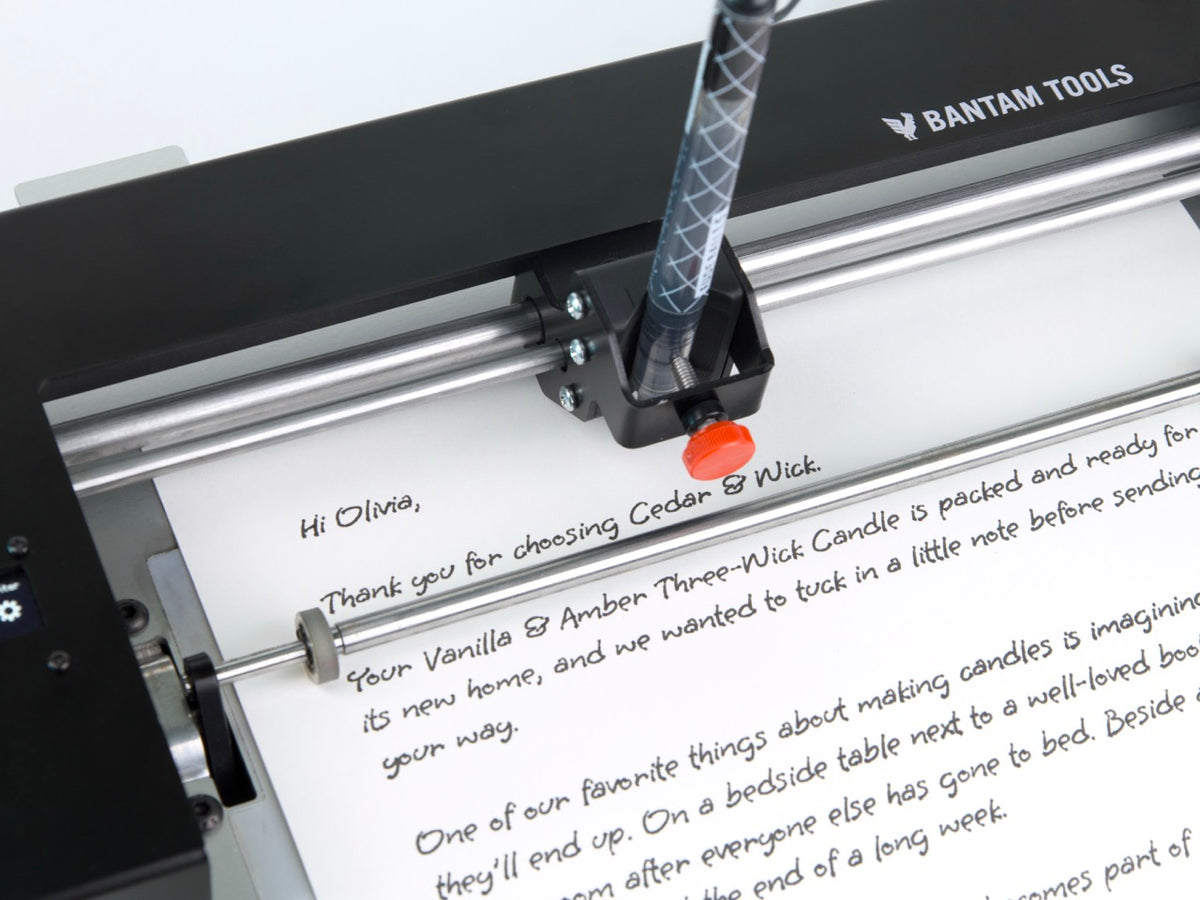
Bantam Tools Studio™ Text Add-On expands Bantam Tools Studio™ with a complete, easy, and powerful handwriting workflow, turning any Bantam Tools Studio™ compatible machine into a Bantam Tools handwriting machine. Transform simple text, customer data, and prepared templates into handwritten letters at campaign scale.

Every Bantam Tools HandWriter® comes with the Studio Text Add-On included, no additional purchase necessary.

  • Connect With Your Customers

    Handwritten communication helps your business feel more personal, thoughtful, and memorable. It gives customers a reason to pause, engage, and remember who you are.

  • Turn Personal Outreach Into Real Results

    Handwritten notes help businesses bring customers back, generate referrals, strengthen relationships, and start more conversations. When outreach is personal, people respond.

  • Create Shareable Moments

    A handwritten note is the kind of thing people notice, keep, photograph, and share. Those moments can help your brand travel further through word of mouth, social sharing, and customer delight.

1 of 3

Bantam Tools Studio™ Text Add-On

Key Features

40 Beautiful Single-Stroke Fonts
Includes 40 beautiful fonts that draw each letter one stroke at a time, helping The Bantam Tools HandWriter® & other Bantam Tools Studio™ capable Machines create realistic handwritten output with real pens and paper.

Open Text Directly
Go from writing a letter to plotting a letter faster than ever. Write in your favorite text editor, like Microsoft Word, Google Docs, or Apple Pages, then open a text file or paste directly from your clipboard into Bantam Tools Studio™, with no SVG editor or design template required. Advanced users can also use an SVG template to customize their export layout.

Data Merge & Template-Based Workflows
Personalize documents using spreadsheet data from Microsoft Excel, Google Sheets, and Apple Numbers, saved as .CSV files. Build reusable templates for batch customization, including names, addresses, notes, order details, and other customer-specific information.

Supports Bantam Tools Font Maker™
Create your own handwriting fonts using the Bantam Tools Font Maker™ iPad app and Apple Pencil. Bring your personal handwriting into Bantam Tools Studio™ to produce letters and messages in your own handwriting style.

Third-Party Font Support
Use additional compatible single-stroke fonts, including fonts from our partners at Quantum Enterprises, to expand your handwriting style options.

Defects & Fine-Tune Controls
Add natural handwriting variation and control the final layout with settings for line spacing, baseline jitter, indent, kerning, letter size, scrunch, letter spacing, word spacing, and text overflow.

Bantam Tools Studio™ Text Add-On

Description

Every Bantam Tools HandWriter® comes with these handwriting tools included, no additional purchase necessary.

Bantam Tools Handwriting Machines create handwritten letters using actual pens and stationery, delivering personal communication that drives response, relationships, and results.

Bantam Tools Studio™ Text Add-On expands Bantam Tools Studio™ with a complete, easy, and powerful handwriting workflow, turning any Bantam Tools Studio™ compatible machine into a Bantam Tools handwriting machine. Transform simple text, customer data, and prepared templates into handwritten letter.

The Bantam Tools Studio™ Text Add-On is for customers using other Bantam Tools Art Machines, including Bantam Tools ArtFrame™, WaterColorBot®, and EggBot®, who want to add handwriting workflows to their existing machine.

Bantam Tools Studio™ Text Add-On is designed so you can start creating handwritten letters right away. Write your letter in any text editor, load it into Bantam Tools Studio™ as a .txt file, or paste text directly from your clipboard to prepare it for pen-on-paper handwriting.Easy-to-use data merge and template-based workflows make it simple to personalize letters, automate repetitive tasks, and produce multiple handwritten documents efficiently. Anyone can start creating custom handwritten letters right out of the box.

Included with Bantam Tools HandWriter®, Bantam Tools Studio™ Text Add-On helps businesses create handwritten communication that is personal, thoughtful, and worth noticing. By turning customer data, donor lists, order details, and lead information into handwritten letters, create outreach that stands apart from printed mail, email, and automated messages.

For marketers, nonprofits, sales teams, agencies, and relationship-driven businesses, handwritten communication supports deeper customer relationships, more memorable follow-ups, increased return sales, stronger donation campaigns, and more effective lead engagement. Bantam Tools Studio™ Text Add-On makes that workflow practical, repeatable, and ready for personalization.

At the center of the workflow are 40 beautiful single-stroke handwriting fonts. Unlike typical outlined computer fonts, single-stroke fonts draw each letter one stroke at a time, helping your machine write more like a person.

No one has perfect handwriting, and it's the small imperfections that make handwriting feel human. Bantam Tools Studio™ Text Add-On gives you control over these natural variations, with handwriting defects and fine-tuning options. These controls let you introduce subtle imperfections while balancing realism, readability, and layout, whether you're creating a single letter or hundreds of personalized messages.

Write in your own handwriting with the Bantam Tools Font Maker™ iPad app and Apple Pencil. Turn your personal handwriting into a custom font that you can use in Bantam Tools Studio™ Text Add-On to create letters and messages that look like you wrote them yourself.

When you need to write more than one letter, Bantam Tools Studio™ Text Add-On helps you create outreach that feels specific to each recipient. People notice when they see their name, their business, their order, their donation, or a detail that reflects their actual relationship with your organization. By bringing those personal details into handwritten letters, you can make each recipient feel recognized instead of processed, while still producing consistent batches of customized handwritten communication.

For users who want even more handwriting styles, Bantam Tools Studio™ Text Add-On supports compatible third-party single-stroke fonts, including fonts from our partners at Quantum Enterprises. This gives teams more flexibility when matching a handwriting style to a brand, campaign, artist, or customer experience.

Expand Bantam Tools Studio™ with the Text Add-On and turn any compatible machine into a powerful handwriting machine. From personalized letters and customer outreach to creative projects, the possibilities extend well beyond paper. Crafters can write names on eggs and ornaments using the Bantam Tools EggBot™, while artists can create certificates of authenticity and personalize artwork with the Bantam Tools ArtFrame™, or sign watercolor paintings using brush pens with the Bantam Tools WaterColorBot™.

Every Bantam Tools HandWriter® comes with these handwriting tools included, no additional purchase necessary.

Bantam Tools Studio™ Text Add-On

Specifications

Included With HandWriter®
Bantam Tools Studio™ Text Add-On comes unlocked with every Bantam Tools HandWriter®, no additional purchase necessary.

Available as an Add-On for Bantam Tools Art Machines
For non-HandWriter® customers, Bantam Tools Studio™ Handwriting Tools requires an active Bantam Tools Studio™ license.

Check out NextDraw Merge software to do Handwriting with the NextDraw series of Drawing & Writing Machines.

Mac and PC Compatible
Bantam Tools Studio™ runs on Mac and PC, so teams can prepare handwriting files from the computers they already use.

Built for and included with 

The Bantam Tools HandWriter®

Bantam Tools Studio™ Text Add-On Compatible Machines

  • Bantam Tools HandWriter®

    Bantam Tools HandWriter®

    Regular price From $1,599.00 USD
    Sale price From $1,599.00 USD Regular price
  • Bantam Tools EggBot™
    Sale

    Bantam Tools EggBot™

    Regular price From $449.00 USD
    Sale price From $449.00 USD Regular price $549.00 USD
  • Bantam Tools ArtFrame™ 1824

    Bantam Tools ArtFrame™ 1824

    Regular price From $2,942.00 USD
    Sale price From $2,942.00 USD Regular price $2,942.00 USD
  • Bantam Tools ArtFrame™ 2436

    Bantam Tools ArtFrame™ 2436

    Regular price From $3,942.00 USD
    Sale price From $3,942.00 USD Regular price $3,942.00 USD
  • Bantam Tools WaterColorBot™

    Bantam Tools WaterColorBot™

    Regular price From $699.00 USD
    Sale price From $699.00 USD Regular price $699.00 USD
1 of 5